Our small-business coverage comes from the day-to-day tools and workflows used to run a handmade ecommerce business across Etsy and WooCommerce. When we call something firsthand, we mean we have actually used it in the workflow described. Product details and current availability can change, so retailer/manufacturer information should be checked before buying.
Quick verdict
We have used the Epson EcoTank ET-3958 for about two years for ecommerce paperwork, school printing, everyday documents, scanning and large document batches. The ink tanks last well in our use, it holds plenty of paper, and it can handle a lot of pages in one sitting. The weak point has been connectivity: the laptop connection can occasionally become frustrating, and when the printer was new we had to uninstall and reinstall the setup a few times before it behaved reliably.
What we have printed with it
This has not been a lightly used “home printer.” It has handled Etsy and WooCommerce paperwork, general household printing, school material, and large batches of documents for appointments and administrative tasks. That mixed workload is useful because it reveals whether a printer is pleasant only for an occasional page or can keep moving when you need a stack of documents.
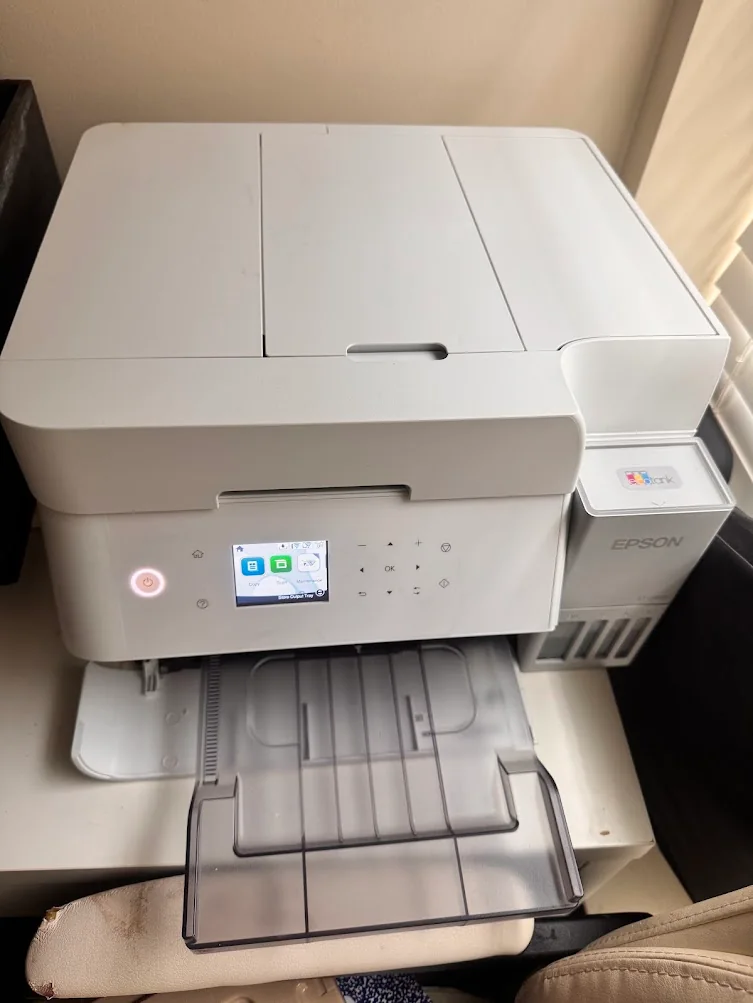
Our ET-3958 after roughly two years of mixed ecommerce, school and document use.
The EcoTank advantage is the ink
The ink has lasted well for us. We do not find ourselves constantly thinking about cartridges or replacing ink after every busy stretch. That is one of the biggest reasons this type of printer makes sense for a household or small business that prints more than an occasional return label.
The paper capacity has also been useful. When you need to print a large packet, it is much nicer to load the tray and let the printer work than feed a small stack repeatedly.
Scanning has been straightforward
The scanner has worked well for the documents we need to digitize. For a small business, that matters for receipts, forms, records and anything that needs to move from paper to a digital file without a separate scanner taking up space.
The main complaint: connectivity
The most frustrating part has not been print quality or ink consumption—it has been the occasional connection issue with a laptop. Most of the time it works normally, but there have been periods where the computer and printer simply did not cooperate. When it was new, we had to uninstall and reinstall the printer software a few times to get the setup working properly.
That would not stop us from using it, but it is the thing we would want another buyer to know before assuming the wireless experience is always seamless.
What we like—and what we do not
- Ink lasts a long time in our use
- Handles large print batches well
- Useful paper capacity
- Good everyday scanning
- Works for business, school and household printing
- Intermittent laptop connectivity can be annoying
- Initial setup took more troubleshooting than we expected
- Not a replacement for a dedicated thermal printer when all you need is shipping labels